TL;DR
Incident management is how IT, DevOps, and operations teams handle service disruptions, from the first alert to the postmortem. It follows 6 steps: identify and log, categorize, prioritize, respond and investigate, resolve and recover, and close and review. The goal is to restore normal operations quickly, so the service is up and running again.
In this guide, we’ll dive into what exactly incident management is, how it differs from incident response, and the key steps involved in it. Also, we’ll discuss the key metrics, best practices, and AI automation.
What is an incident?
An incident is any unplanned event that disrupts a service or lowers its quality for your users. For example: your website goes down, customers can’t log in, or the checkout page takes a full minute to load.
However, events like planned maintenance (a database upgrade you announced in advance) or early warnings that aren’t affecting anyone yet (a server running at 50% CPU) are not considered incidents. Nothing is broken for your users, so they don’t need an immediate response.
How are incidents classified?
Incidents are classified by how critical they are and how urgently they need a fix. That gives you four combinations.
Critical is about impact, which covers how much of your system or how many users an incident affects. Urgent is about time, which covers how fast someone needs to act.
| Type of incident | What it means | Example |
|---|---|---|
| Critical and urgent | Significant impact that needs action now | Login goes down at peak hours |
| Critical but not urgent | Significant impact with time to act | A data sync job has been failing silently, found during working hours |
| Urgent but not critical | Limited impact that still needs a fast answer | An enterprise customer can’t access one feature |
| Neither critical nor urgent | Limited impact that can wait | A dev cluster’s CPU jumps over the weekend |
To learn more about these four combinations, read this guide: Four types of incident alerts every team should know
What is incident management?
Incident management is the process of identifying, managing, and resolving incidents that disrupt IT services. The goal is to restore normal operations quickly and then learn from what happened, so the same incident doesn’t repeat.
Say a deployment breaks checkout. A quick rollback gets users paying again in minutes, which beats an hour of debugging on a live system. You can dig into why it broke once things are up and running.
Incident management is important because it gives your team a plan of action when an outage hits and helps restore the service quickly. The right engineer gets paged the moment something breaks, nobody wastes time asking who owns the fix, and customers hear from you before they start complaining.
Incident management vs incident response
People often use these terms interchangeably. However, they are not the same.
Incident response is the tactical work of finding the cause and resolving an incident. Whereas incident management is a more comprehensive process that handles every incident end to end, from the first alert to the postmortem.
| Criteria | Incident response | Incident management |
|---|---|---|
| Focus | Find the root cause and resolve the incident | Manage the incident end to end, from the first alert to the postmortem |
| Scope | One live incident and its fix | Every incident, plus the on-call, severity, and review processes around it |
| Timeline | While the incident is live | From alert to postmortem |
| Who is responsible | On-call engineers and experts | The whole team, including support and leadership |
Say your on-call engineer rolls back a bad deployment. That’s incident response, while the schedule that paged them, the status page update customers saw, and the postmortem the next morning all fall under incident management.
To learn more about incident response, read this guide: What is incident response?
The incident management process in 6 steps
1. Identify and log
Identification is the step where you spot and record an incident. A monitoring alert, a user report, or a support ticket flags the problem. The incident then gets a record with a title, a start time, and the affected service.
Who does it: monitoring tools like Datadog, Grafana, and CloudWatch, or the person who spots the issue. An incident management tool creates the record on its own.
2. Categorize
Categorization is the step where the incident is sorted by type. The type can be infrastructure, application, network, or security. The affected service gets noted too, like payments or search, and this tells you which team owns the incident.
Who does it: the on-call engineer, or an Alert Routing rule that reads the alert.
3. Prioritize
Prioritization is the step where the incident is ranked by impact and urgency. It gets a severity from SEV1 to SEV3 and a priority from P1 to P5. The rank decides how fast the team acts and who gets woken up.
Who does it: the on-call engineer, or an Alert Routing rule that sets the severity and priority from the alert.
4. Respond and investigate
Response is the step where the right people are alerted and start working on the problem. The on-call engineer acknowledges the alert, and if nobody responds, the escalation policy pages the next person. The team then checks dashboards, logs, and recent deployments to find the cause, while customers get a status page update.
Who does it: the on-call engineer and subject matter experts. The incident commander leads the incident response, and the communications lead handles updates.
5. Resolve and recover
Resolution is the step where the issue is fixed and the service works normally again. This could be a rollback, a config change, or a code fix that minimizes the impact. Recovery confirms that users can work again and no data was lost.
Who does it: the on-call engineer and subject matter experts.
6. Close and review
Closure is the step where the incident is marked as closed and the team learns from it. The status page gets a final update, and the team can run a blameless postmortem after every incident to find what to change.
Who does it: the incident commander or on-call engineer closes it. The whole team joins the postmortem, and the scribe’s notes guide it.
Incident management roles and responsibilities
Everything starts with the on-call responder, because they’re the first to know. If the issue is small, they handle it end to end and nobody else needs to join.
When an incident grows, someone needs to steer it, and that’s the incident commander. They decide what the next steps are.
The commander then pulls in subject matter experts who know the failing system, like the engineer who owns the payments database. At the same time, a communications lead takes over updates, so engineers aren’t interrupted by questions from support or leadership.
In the background, a scribe keeps notes on decisions and timings, and those notes become the backbone of the postmortem. Stakeholders such as product leads only need to stay informed, so they get the important updates.
Real-world incident management example
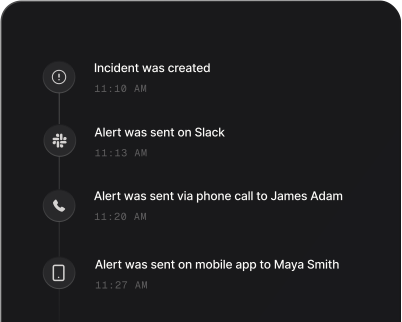
To show the six steps in action, we set up a sample gas agency in Spike. It has an on-call schedule, an escalation policy, and a status page. Then we triggered a test leak report late at night. Here’s how it moved through each step:
- Identify and log: a leak report came in, and Spike turned it into an incident right away. The first alert went out as a phone call to the on-call engineer.
- Categorize: an Alert Routing rule saw it was a home issue at night, so it sent the incident to the pipeline team.
- Prioritize: another Alert Routing rule spotted the word “leak” in the title and set it to P1 and SEV1.
- Respond and investigate: the on-call engineer didn’t pick up the call. So the escalation policy called the next person in line, who acknowledged it. The team then ran a Leak Response playbook, which opened a war room and posted the issue on the status page.
- Resolve and recover: once the leak was fixed, the team resolved the incident. A second playbook closed it on the status page too.
- Close and review: the team went through the incident timeline. The main lesson was to answer the first call quickly, because the missed call sent the alert up the escalation chain.
Key point: Alert Routing rules and Playbooks can help you automate routine tasks like setting severity, creating tickets, etc. This way, you can focus on finding the root cause and resolving the incident.
Incident management metrics
MTTD (mean time to detect): the average time between a problem starting and your monitoring or team noticing it. A low MTTD means your alerts catch issues before users report them.
MTTA (mean time to acknowledge): the average time from an alert firing to someone on-call acknowledging it. It shows how quickly your on-call team reacts.
MTTR (mean time to resolve): the average time from the alert to the fix, when the service is back to normal operations. It’s the clearest measure of how fast you recover.
MTBF (mean time between failures): the average time a service runs without problems between one failure and the next. You get it by dividing the total time the service was up and running by the number of failures. A higher MTBF means the service breaks less often.
MTTF (mean time to failure): the average time a part runs before it fails for good and needs replacing, like a disk. You get it by dividing the total running time of those parts by the number of parts that failed. It tells you how long a component usually lasts.
MTTA and MTTR are a good pair to begin with, and the others can follow as your process matures.
To learn more about these metrics and how to calculate them, read this guide: MTBF, MTTR, MTTF, and MTTA explained
5 best practices for incident management
- Write down your severity levels with one example each. Then everyone on-call sets the same level for the same kind of incident, and nobody debates it in the middle of an outage.
- Give every service an owner team. Alerts then reach the right people, so the first responder can start fixing the issue right away.
- Match the alert channel to the severity, with phone calls for SEV1 and Slack for SEV3. That way, a phone call always means the incident is critical and the team needs to act immediately.
- Update your status page within 15 minutes of a SEV1. Even “we’re investigating” is better than silence, and it cuts the support tickets that pile up while you work on the fix.
- Run a blameless postmortem after every incident and turn each action item into a ticket with an owner. Action items without an owner get forgotten, and the same incident repeats.
While dealing with incidents, you might face some challenges. And we have covered the common challenges and how to deal with them in our blog. Read it here →
How automation and AI help incident management
Some steps in incident management can be automated, like setting severity, paging the right person, and updating the status page. Alert Routing rules and Playbooks handle these steps for you, and AI pushes the boundary further by automating more of the work.
Alert Routing rules read each alert the moment it arrives. They set its severity and priority and send it to the team that owns the service. Playbooks then run the routine tasks for that incident: they open a Slack or Teams channel, create a Jira ticket, and post status page updates.
AI gives you a better picture of the incident. It gathers recent deployments, logs, etc., and gives you an analysis to work on. Also, once the incident is resolved, it creates a postmortem with all the details.
How to get started with incident management
- List the critical services and set up alerts on those first. For an online store, that’s checkout and payments.
- Create an on-call schedule and add an escalation policy. The schedule gives every alert an owner, and the escalation policy pages a backup if that person doesn’t acknowledge within a set time.
- Agree on what is a SEV1, SEV2, or SEV3 incident. For example, SEV1 is “nobody can log in or pay”, SEV2 is “search fails in one region”, and SEV3 is “CSV export fails, but the API works”.
- Pick one Slack channel for incident updates and set up a status page. Conduct short reviews after every incident to catch more problems than one long review each quarter.
How Spike helps you manage incidents
Spike is an incident management and on-call platform. It handles every step of the incident management process in one place, from the first alert to the postmortem.
Connect monitoring tools like Grafana, Datadog, AWS CloudWatch, or plain email so every alert becomes an incident in Spike. Alert Routing rules then set its severity and priority and send it to the team that owns the service.
From there, on-call schedules and escalation policies make sure the right person hears about it. Spike reaches them by phone call, SMS, WhatsApp, Slack, Teams, or push notification, and pages the next person if nobody acknowledges.
While your team works on the fix, Playbooks handle the routine tasks for you. They open a war room, add runbook links, and update your status page, which comes with every plan.
Once it’s resolved, the resolution notes and incident timeline give your postmortem the facts it needs.
Give your next incident a clear path
Incident management doesn’t need a big rollout to start working. An alert on your most critical service, an on-call schedule, and agreed severity levels already give every incident a clear owner and a clear path. From there, each postmortem shows you the next thing to improve.
Spike puts alerts, on-call, escalations, and status pages in one place, so your first setup takes minutes, not weeks.
Go ahead and try it out with a 14-day free trial.
FAQs
What is the difference between incident management and problem management?
The main difference is intent: incident management restores service quickly, while problem management finds and fixes the underlying cause. Say your app crashes every week because of a memory leak. Incident management restarts the app to get users back, and problem management investigates and fixes the leak so the crashes stop.
What does an on-call engineer do during an incident?
The on-call engineer is the first responder. They acknowledge the alert, check how many users are affected, and set the severity. Then they either fix the issue themselves, like rolling back a bad deployment, or escalate to the incident commander and subject matter experts. Once the service works normally again, they resolve the incident and add notes for the postmortem.
How do you reduce alert fatigue?
Only alert on things that need action. Group duplicate alerts, send minor ones to Slack instead of a phone call, and review noisy alerts after every on-call week.
What tools do you need for incident management?
You need a monitoring tool to detect problems and an incident management tool for alerting, on-call schedules, and escalation. Add a chat tool like Slack or Teams for the war room and a status page for customer updates. Spike covers alerting, on-call, escalation, and status pages in one platform.
What are P1, P2, P3, and P4 incidents?
P1, P2, P3, and P4 are priority levels that set how fast an incident needs a response. A P1 needs action right now, a P2 within the hour, a P3 during working hours, and a P4 can wait until the next work shift.
Do small teams need incident management?
Yes, small teams need it too, even with two or three engineers. One alert, a shared on-call schedule, and an escalation policy already make sure nobody misses a critical incident.