TL;DR
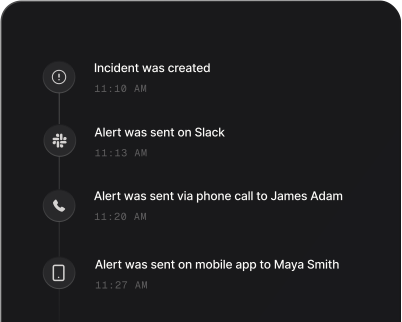
Incident response is the process your team follows to triage, fix, and resolve unplanned disruptions in production, like a crashed payment gateway or a failed deployment. Alerting reaches the on-call engineer immediately, an escalation policy moves the alert to the next person if they miss it, and on-call rotations share the load so nobody burns out. Prioritization separates urgent incidents from the ones that can wait, and automation runs playbooks for common incidents.
In this guide, we’ll dive into what incident response is, how it differs from incident management, and the four steps of its lifecycle. We’ll also discuss the best practices and how AI is changing incident response.
What is incident response?
Incident response is the process your team follows when something breaks in production. It covers how your team triages the incident, finds the cause, and fixes it until the service works normally again. The goal is to get your services back to normal operations as quickly as possible and limit the damage to your users.
With an efficient incident response, every engineer knows their role, updates reach the right people on time, and the whole team follows the same playbook instead of improvising under pressure.
Real-world example of incident response
Say payments fail on your e-commerce store at 2 AM. With incident response in place, your team resolves the incident in 15 minutes instead of 5 hours.
Without incident response, nobody even notices the failed payments until morning. Support tickets pile up overnight, and your team spends the first hours of the day working out what broke.
With incident response, the on-call engineer gets a phone call at 2:00 AM, the moment the incident triggers. They check the payment service, find that the API connection failed and follow the response playbook for payment failures. By 2:15 AM, customers can pay again.
So with this, something that could have been 5+ hours of lost sales becomes a 15-minute disruption.
Why is incident response important?
Incident response matters because it keeps downtime short. Without it, a checkout failure plays out like this: Engineers debug the same service in parallel without knowing what the others found. Managers message them every 10 minutes for updates, and support has no answer for the customers writing in. A glitch that needed one config rollback turns into hours of downtime and a dent to your brand.
A clear incident response process changes three things:
- Your team spots issues early and fixes them fast, which cuts downtime and revenue loss.
- Customers keep trusting you, because a fast fix shows them you’re reliable even when things break.
- Engineers stay focused when alerts fire at 2 AM, because they know their roles and follow a tested plan.
As your systems grow, the cost of each incident grows with them. A structured response lets your team handle that complexity.
Incident response vs incident management
Incident response is the action your team takes to find the cause of an incident and resolve it. Incident management covers the incident end to end, from the first alert to the postmortem.
| Incident response | Incident management | |
|---|---|---|
| Focus | Find the root cause and resolve the incident | Manage the incident end to end, from the first alert to the postmortem |
| Scope | One live incident | Every incident, plus the processes around them |
| Timeline | From the alert until the service works normally again | Before, during and after each incident |
| Who is responsible | On-call engineer and incident manager | Engineering leads and SRE managers |
To learn more about incident management, read this guide: What is incident management?
What are the 4 steps of incident response?
Incident response starts when an alert reaches your team and ends when the incident is resolved. Everything in between falls into four steps.
1. Triage
Triage is the step where you confirm the incident and decide how serious it is. The on-call engineer acknowledges the alert, checks how many users are affected, and sets the incident’s severity and priority. For critical incidents, they also pull in the incident manager and the experts who own the affected service.
Who does it: the on-call engineer, with the incident manager joining for critical incidents.
2. Find the root cause
Finding the root cause is the step where you work out why the service broke. The team checks dashboards, logs, and recent changes such as deployments, config changes, and traffic surges. Recent changes are worth checking first.
Who does it: the on-call engineer and the subject matter expert who owns the affected service.
3. Apply the fix
Applying the fix is the step where you stop the damage to users. Common fixes are rolling back a deployment, restarting a service, scaling up capacity, or changing a config. A quick rollback gets users back faster than a full code fix, which can follow later.
Who does it: the on-call engineer and the subject matter expert, with the incident manager approving the change.
4. Resolve the incident
Resolving the incident is the step where you confirm the service works normally again and close the incident. The team runs real checks, watches the system, and posts a final update on the status page.
Who does it: the on-call engineer and the communication coordinator.
How do you get started with incident response?
Step 1: Map your critical services
The first step is usually a list of the problems that need an alert immediately. They point to your critical services, the parts of your system that customers and revenue depend on. For an e-commerce site, that’s payment processing and the checkout flow.
Step 2: Set up alerts, on-call rotations, and escalations
Alerts that trigger when a critical service fails come next, and urgent ones work best as phone calls. An on-call schedule then decides who receives them and spreads the load across the team. An escalation policy makes sure the alert reaches a backup responder if the first person misses it.
Step 3: Define incident categories
Not all problems need the same response. Simple criteria based on impact and urgency help you classify incidents, and three levels (high, medium, and low) are probably enough at first. The categories get sharper as you handle more incidents. In Spike, every incident carries a severity and a priority, so you can route each incident to the right responders based on both.
Step 4: Write a response plan and test it
A short plan for each severity level says what to do and who gets involved. A low-severity incident stays with the on-call engineer, a medium-severity incident brings in a subject matter expert, and a high-severity incident pulls in the incident manager and the communication coordinator. A practice drill shows whether the plan works, and it’s worth updating after every real incident.
5 incident response best practices
- Document step-by-step response plans for your most common incidents, like payment outages or database failures, and save them where responders can find them in seconds.
- It can be helpful to assign an incident manager, technical lead, or communication coordinator before an incident, so nobody asks who’s in charge when it starts.
- Message templates for common incidents and communication channels picked in advance make updates easier. Critical incidents often need an update every 30 minutes.
- Automating alert routing, ticket creation, and status page updates leaves your team more time for the fix.
- Auto-resolving alerts nobody acts on and grouping related alerts into one incident reduce alert noise, so every page means something.
How AI is changing incident response
AI speeds up incident response by reading the alert, logs, and chat for you and turning them into context you can act on. When a responder joins, it sums up what has happened so far in one message. It also checks the incident against recent deployments, config changes, and similar past incidents, so you know where to look first.
As the investigation goes on, AI suggests the next log, dashboard, or runbook step based on what the team has already tried. It groups related alerts into one incident, so a single failure doesn’t page you again and again. Once things are stable, it writes the first draft of a status update or postmortem timeline for a person to edit before it goes out.
Three decisions still stay with people: approving changes to production, sending messages to customers, and running the review.
In Spike, you can ask Spike AI inside Slack to summarize what happened, point at possible root causes, and suggest what to check next. With the Spike MCP server, you can also bring incident details and on-call information into Claude Code or Cursor while you debug.
Set up your incident response today!
Incident response isn’t about never breaking things. It’s about how fast you recover when they do. That’s why the order matters: stop the damage first, then fix the cause, and finally learn from what happened.
You don’t have to set it all up at once. Start with an alert on your most critical service, so the right engineer knows the moment it fails. Once that works, add an escalation policy, severity levels, and a review after every incident.
FAQs
Is incident response the same as a SOC?
No, they’re different things. A SOC (security operations center) is a security team that watches for threats like breaches and malware. Incident response is a process that both SOC teams and engineering teams follow: SOC teams use it for security incidents, and engineering teams use it for outages, failed deployments, and slow services.
What is the difference between an incident response plan, a playbook, and a runbook?
An incident response plan sets who does what across all incidents. A playbook covers the response to one type of incident, and a runbook lists the exact steps for one task inside it, such as restarting a service or failing over a database.
When should you notify customers about an incident?
Notify customers early about critical incidents that affect many users, with a short “We’re aware and working on it” message. For minor issues, wait until you know the impact and the expected fix time, so you don’t cause unnecessary concern.
What metrics should you track to measure incident response?
Track mean time to detect (MTTD), mean time to acknowledge (MTTA), and mean time to resolve (MTTR). MTTD shows how fast you discover incidents, MTTA how fast someone starts working on them, and MTTR how fast you fix them.